
To Mesh or Not to Mesh
To mesh, or not to mesh? And honestly, it’s a fair question. Mesh networks sound magical — simple, seamless coverage! But before you go mesh-crazy, let’s talk about what really happens behind the scenes.
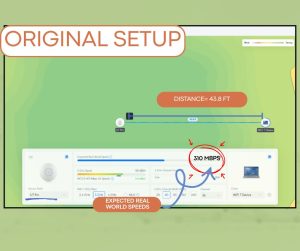
Using the Wi-Fi Calculator, we ran a little experiment.
In the first picture you see that at 43.8 ft and using a U7Pro and a client with a Wi-Fi 7 card, we have an expected real-world speed of 310 Mbps. I can only achieve an MCS of 8 so I can’t take advantage of the high throughput speeds available with WiFi 7
When I add a U6 Mesh halfway between the devices I have a 430Mbps link between the Pro and the Mesh

But only a 215Mbps link to the Client. What happened? Even though the Signal between the Mesh Device and the Client is excellent and I can achieve an MCS of 1,1 I still only get half the throughput that the Mesh Device is receiving.
⚠️ Welcome to the Law of Halves
Here’s the catch: Wi-Fi is half-duplex, meaning it can’t send and receive data at the same time. So when your Mesh AP talks to the main AP and your device, it’s splitting its attention — and its throughput.
Every time you add a mesh hop, your speed gets chopped in half:
- 1 Mesh = ~215 Mbps
- 2 Meshes = ~107 Mbps
- 3 Meshes = ~53 Mbps
- 4 Meshes = ~26 Mbps
And don’t even think about going beyond 4 — Ubiquiti won’t let you. The devices just won’t stay connected.
🛠️ So… Should You Mesh?
Here’s the golden rule: Mesh is great for small spaces with a few out-of-range clients — especially when running cable isn’t an option.
It’s installer-friendly, but user-unfriendly if you’re chasing high speeds or supporting lots of devices. If you can wire it, do it. If you can’t, mesh responsibly.
💡 Final Thoughts
Mesh networks are like fast food — convenient, but not always the healthiest choice for your network’s performance. Use them wisely, and your users will thank you.
Author: Eric Weber
