🚫 UniFi Owner Lockout: The Problem

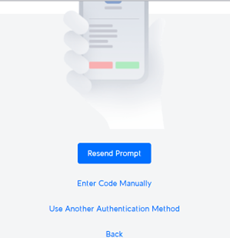
When the user with UniFi Owner privileges leaves the company, you’re stuck. As of now, there’s no password reset option for the Owner account. The only recourse? A Factory Reset of the Console—which can trigger a cascade of device resets across the site.

✅ Ways to Mitigate the Impact

1. Super Admin Workaround

  • If you only have Super Admin access:
  • “Forget” all devices before performing a Factory Reset.
  • After the reset, once the Console is back online, you can re-adopt the devices.
  • ⚠️ You won’t be able to restore from a backup, as that’s reserved for the Owner.

2. Preserve Your Naming Scheme

  • Before resetting:
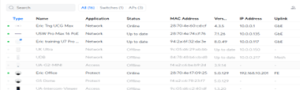
  • Take screenshots of the Devices page to retain names and configurations when re-adopting.

🛡 Best Practices to Prevent This Scenario

Option 1: Shared Owner Access

  • Create a role-based email (e.g., support@it.net) and assign it the Owner role.
  • Share credentials among trusted staff.
  • ⚠️ Trade-off: Shared access complicates accountability and auditing.

Option 2: Use a Managed Email Account with Recovery

  • Assign the Owner role to a mailbox within a managed system like Microsoft 365.
  • Benefits:

– Admins can initiate password recovery without factory resets.

– MFA can be reassigned or reset via centralized email tools.

Author: Eric Weber
Big Changes Coming to Ubiquiti Certification Classes

In this video, I will be discussing some exciting updates for our Ubiquiti certification classes, specifically for the UEWA and the UNS. We are transitioning to a new approach where we will provide each student with a dream machine instead of relying on software installations on their computers. I will explain the benefits of this new paradigm and cover various routing, switching, and application capabilities introduced in the UNIFI line. Additionally, we will explore UNIFI Protect, camera systems, door access, UNIFI Talk, and UNIFI Connect. Lastly, I will introduce the new Wi-Fi MAN tool and request that you bring your own device to class.


Author: Eric Weber

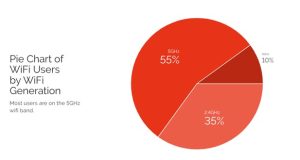
An interesting update on the percentage of users in the three different spectrums

When 802.11ac was introduced in 2013, some Wi-Fi engineers predicted that the Wi-Fi industry would quickly move away from 2.4GHz and start using the 5GHz spectrum, and, although there has been a steady transition, 2.4GHz still holds a rather large portion of the pie.

Remember, there are only three 20MHz non-overlapping channels in 2.4; channels 1,6 and 11, while 5GHz has 25 channels to choose from.

6GHz offers even more channels to choose from, but the FCC only allowed for it’s use in 2020. It looks like the early adopters have jumped in, but what will happen to the 35% of users still using 2.4?  It seems like we will be supporting it for a long time to come.

Author: Eric Weber

Webinar: What’s New with UniFi APs, and How Do I Choose?

The “What’s New with UniFi APs, and How Do I Choose?” webinar was hosted by DoubleRadius on Nov. 30th, 2022. The presentation was made by wifi-U as special guest. A review of security gateways, controllers, and switches is followed by an AP comparison including AC Wave 1 & 2, ceiling mount, in-wall, mesh, HD & XG models. WiFI-6 802.11ax is covered towards the end, and the primary improvement of OFDMA.